Attendance, hours worked and site crews, in one place.
Manpower in Zeno+: attendance from site to payroll, so every day worked is counted · 2:31
Manpower records every working day across the office, sales and site teams. Staff check in on their phones with face and location verification, each team keeps its own working hours, and Zeno+ calculates late arrivals, half days and full days automatically. Off-site check-ins and leave requests arrive in a single approval list, site engineers record crew attendance each evening, and payroll receives the days and hours already totalled.
RulesMatch the shiftOffice, sales or site hours, with grace time
03
RulesCount the hoursLate, half day or full day, worked out
04
PersonApprove the exceptionsOff-site punches, late logins and leave
05
PersonLog the crewSkilled and unskilled counts, typed or spoken
06
RulesReady for payDays for payroll, crew work for the payslip
AI checks faces and listens. Rules count the hours and every rupee.
People approve the exceptions. AI never decides an amount.
See it on real screens.
Attendance you can trust.
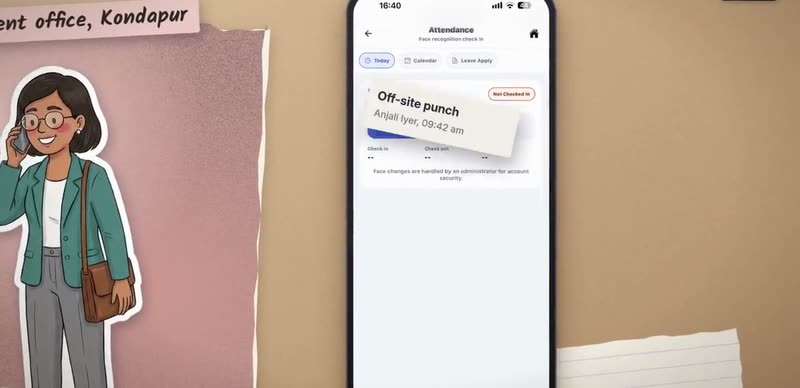
Check in with a tap: the phone matches the face and checks the location. Inside the site's 100 m geofence it's a normal check-in; at a client office, like Anjali's in Kondapur, it's saved as an off-site punch.
Without it: A paper register anyone can sign.
1Check in on the phone
2Only inside the site's 100 m
3Off-site check-in at a client
Example 1 of 11
The whole team, at a glance.
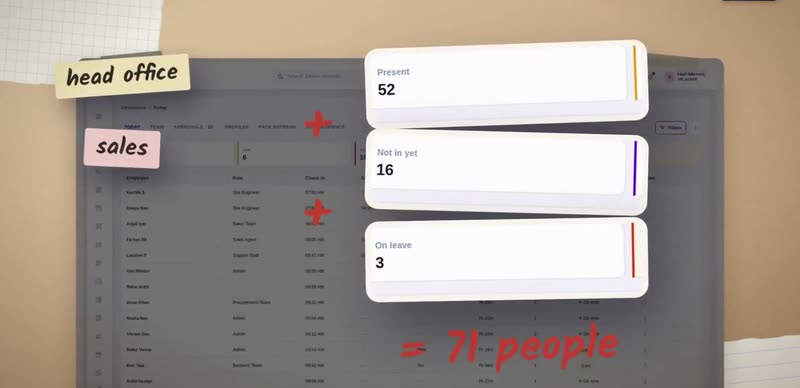
Hari sees the whole company at 4:30: 52 present, 16 not in yet and 3 on leave, 71 people across head office, sales and site, with each person's check-in, check-out and hours.
Without it: Calls to ask who came in.
1Present, not in yet, on leave
2Head office, sales and site together
Example 2 of 11
Office, sales and site, each on its own clock.
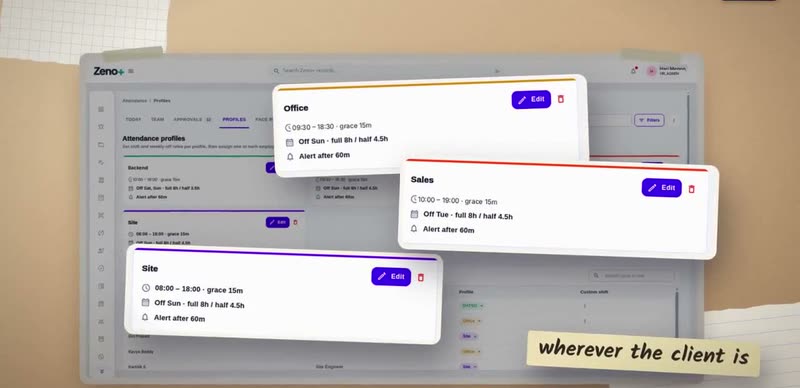
Each team keeps its own clock. Office runs 9:30 to 6:30 with 15 minutes' grace and Sunday off, sales runs 10 to 7 with Tuesday off, and site runs 8 to 6. A full day is 8 hours and a half day is 4.5.
Without it: One rule for everyone.
1Start, end and grace time
2Hours for a full or half day
3Each person on a profile
Example 3 of 11
Exceptions decided, not argued.
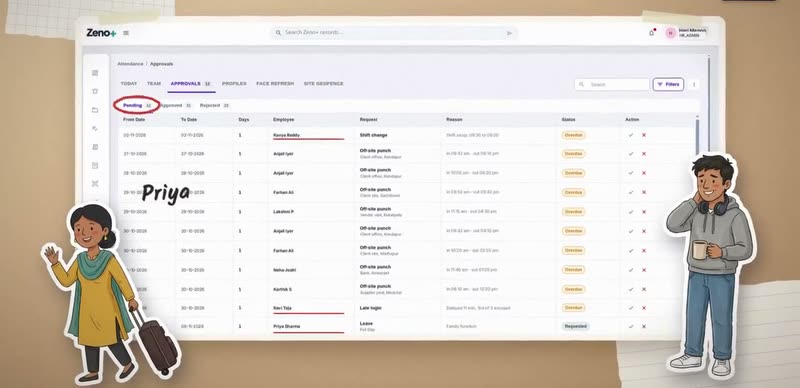
Anjali spent the 27th at a client office in Kondapur, from 8:42 am to 6:10 pm. Her off-site punch waits in one list with the place and times, next to late logins and leave, to approve or reject.
Without it: Off-site days argued at month end.
1Off-site punches, with the place
2Leave, with a reason
3Approve or reject in one list
Example 4 of 11
Faces kept up to date.
Karthik's look changed, and the face check stopped matching. An admin refreshes his face, and his check-in is back to one tap.
Without it: Check-ins fail, and no one knows why.
1No match after a new look
2An admin refreshes the face
3Back to one tap
Example 5 of 11
No surprise loss of pay.
Giri's calendar showed 27 and 28 October as blank. His check-ins, 7:58 am and 8:04 am at Palm Meadows, are found and counted, so there's no loss of pay.
Without it: Loss of pay found on the payslip.
1Present, absent and leave, day by day
2A blank day, spotted early
3The check-ins found and counted
Example 6 of 11
Payroll locks on time.
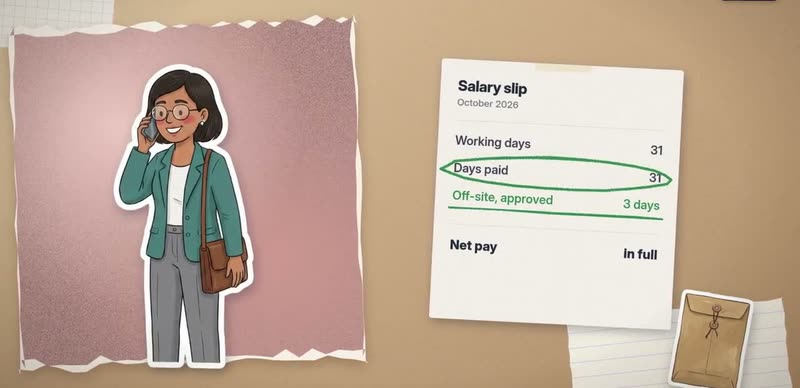
Before 6 pm, leave, corrections and late logins are settled and payroll locks on time. Anjali's October slip: 31 days worked, 31 paid, net pay in full.
Without it: Payroll held up by missing days.
1Leave, corrections and late logins settled
2Payroll locked
3Paid in full
Example 7 of 11
Filed in seconds.
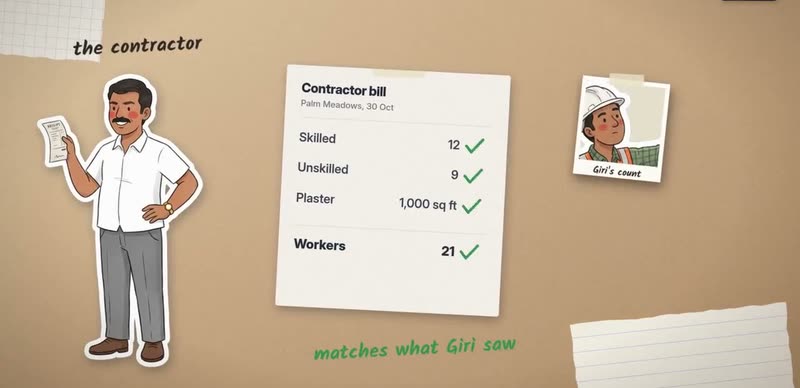
In the evening Giri logs the crew on site: 12 skilled and 9 unskilled workers and 1,000 sq ft of plaster. The contractor's bill is checked against it and matches.
Without it: Crew counts sent on WhatsApp.
1Skilled and unskilled counts
2Work done, in sq ft
3The contractor's bill matches
Example 8 of 11
Filed in seconds.
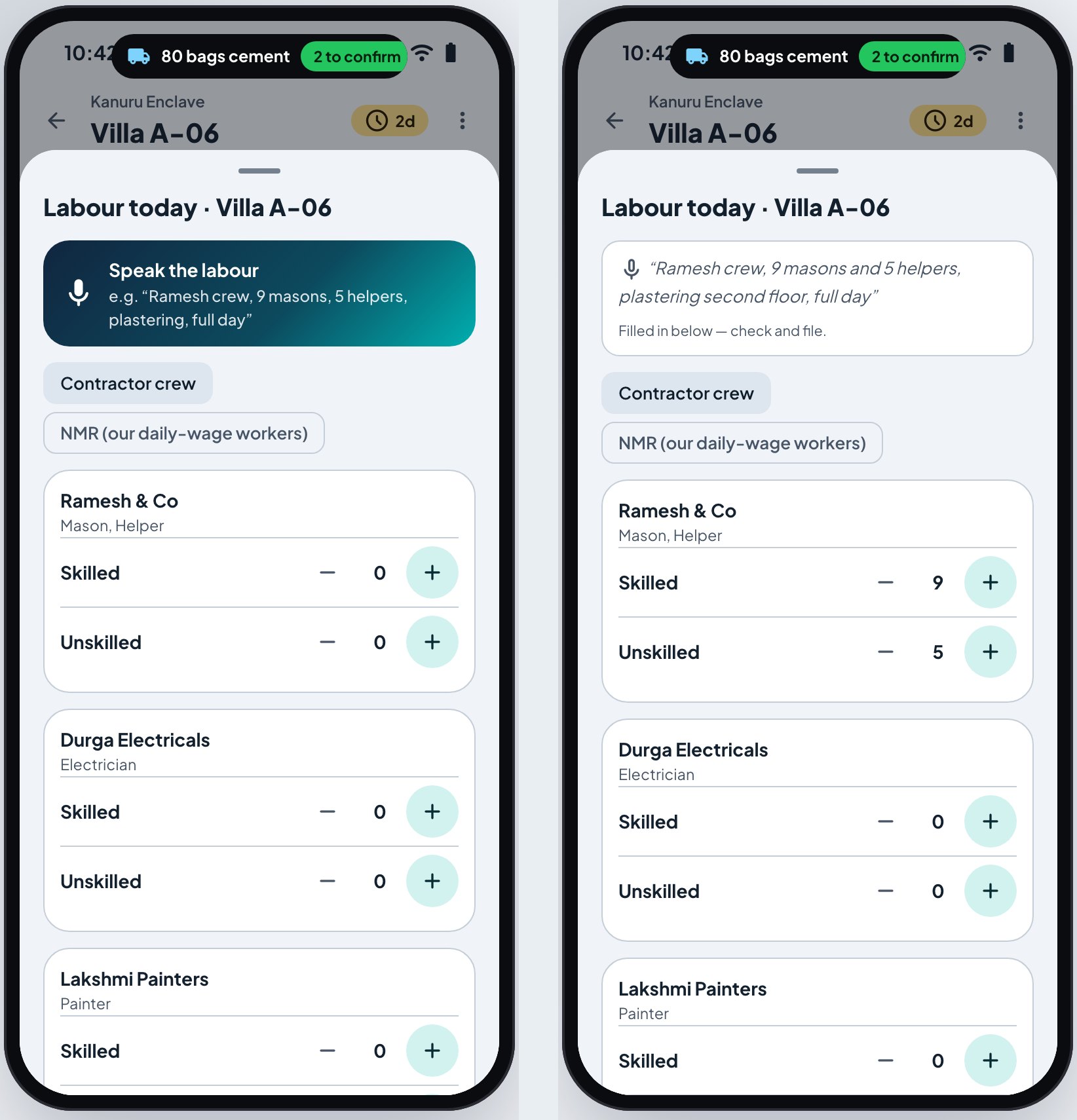
Or he just says it. Tap and speak in Hindi or English, Zeno+ AI writes down what it heard, and fills in the counts for him to check.
Without it: Crew counts sent on WhatsApp.
123
1Tap and speak, Hindi or English
2AI writes what it heard
3Counts filled in to check
Example 9 of 11
Pay only for real work.
Every labour entry from every site lands in one list, and duplicates are flagged before anyone is paid.
Without it: Mistakes found after paying.
1Every entry in one list
2Duplicates flagged before pay
Example 10 of 11
Paid in minutes, with proof.
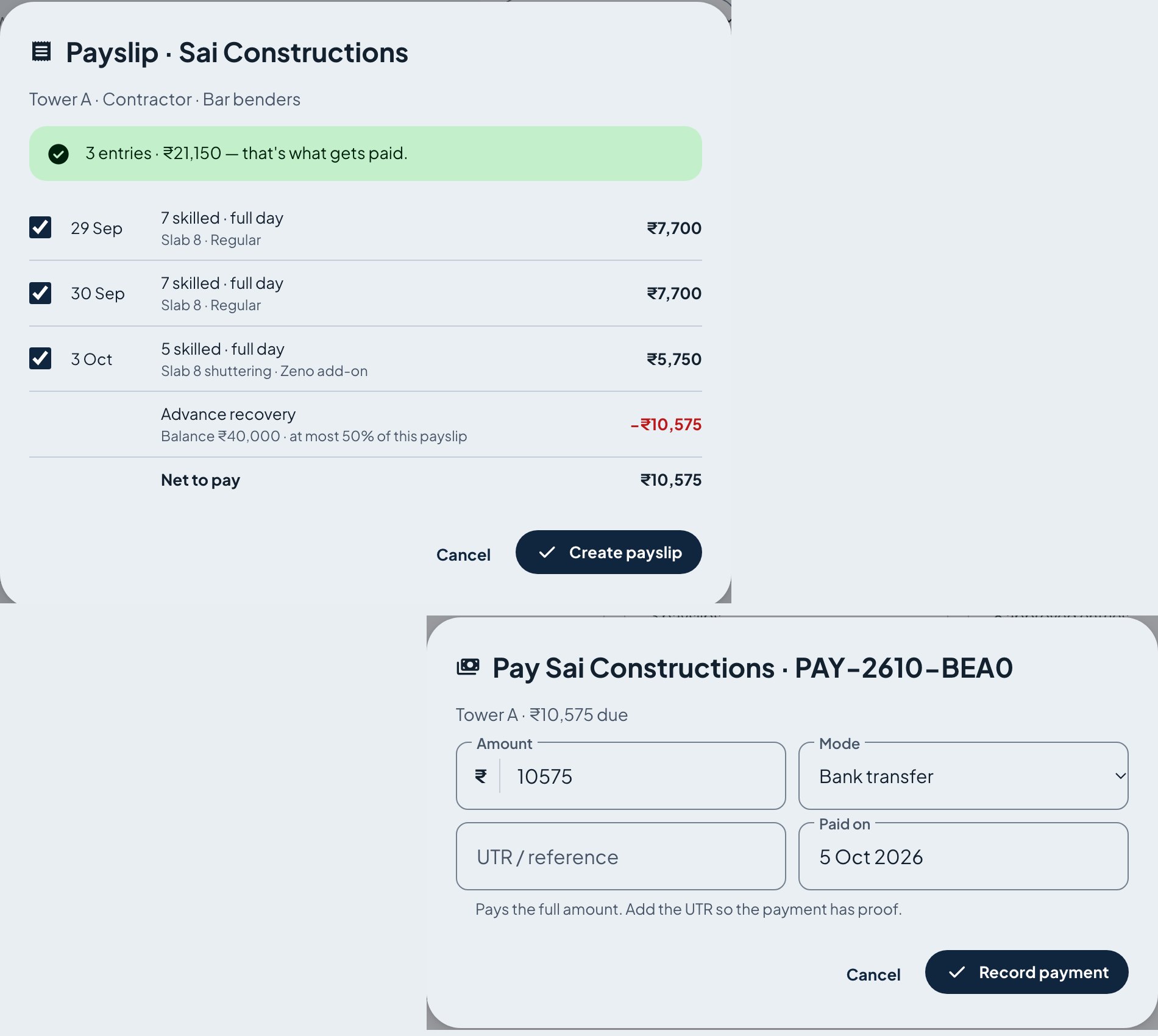
Checked entries go onto the contractor's payslip, advances are recovered automatically, and the transfer reference is saved as proof.
Without it: Payslips worked out in Excel.
123
1Checked entries go on the payslip
2Advances recovered automatically
3Transfer reference as proof
Example 11 of 11
Before Zeno+
Days lost before payroll.
Registers on paperAnyone can sign for anyone
Hours added up at month endFrom memory and Excel
Off-site days not countedThen cut as loss of pay
Crews sent on WhatsAppWho worked, and where?
What changes
Pay that matches the days worked.
EmployeesEvery day countedNo surprise loss of pay.
HR and adminPayroll on timeDays and hours already added up.
SiteCheck in, log the crewFrom one phone app.
Owners and financeEvery payment traceableBack to days on site.
A few practical questions.
Can each team keep its own hours?
Yes. Office, sales and site each get a profile: start and end time, grace minutes, weekly off, and the hours for a full or half day.
What about work away from the office?
Check in where the work is, like a client office or a vendor visit. It goes to a manager as an off-site punch to approve.
What if the face check fails?
It says why: too dark, the sky behind you, or outside the site. The person fixes it and tries again. If someone's look changes, an admin refreshes their face.
Does voice understand site words?
Yes: words like mistri, mazdoor and thekedar. The engineer always checks the counts before filing.
Manpower
Pick one team and one site.
We'll show you last month: days worked, hours counted, and what didn't add up.