Upload any bill; Zeno+ reads and checks it, and highlights anything that needs attention.
Invoices in Zeno+: Vikram pays Prakash before the noon bank run · 2:14
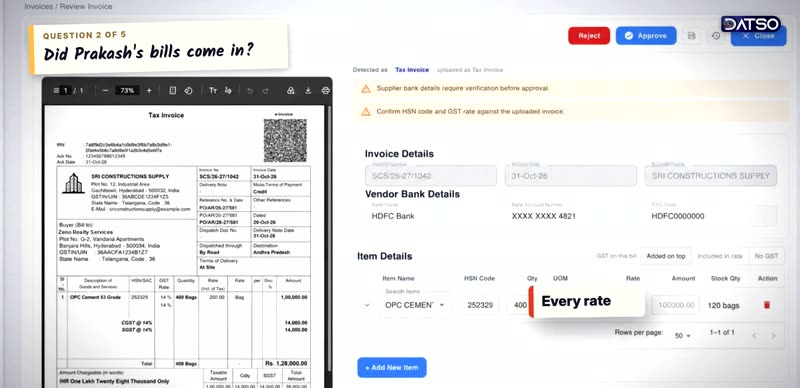
Invoices reads every bill you upload, whether a PDF, a merged PDF, a scan or a phone photo, so no one has to enter it manually. It identifies where each bill begins, reads the vendor, GST number, line items and rates, matches the vendor and units of measure, and verifies the totals and the document type. Any exception is flagged with its reason, and approved bills proceed to payment with full proof.
AIDetect & splitWhat each page is, where each bill starts
03
AIRead the billVendor, number, date, lines, units, GST
04
RulesMatchVendor by GSTIN, items and unit rules
05
RulesCheck & flagTotals, duplicates, prices, document type
06
PersonReview & approveAnswer flags, fix, approve or reject
AI does the reading. People make the decisions.
AI never approves a bill and never makes a payment.
See it on real screens.
Today's work, visible in seconds.
Vikram opens Invoices at 11:40: 15 bills worth ₹41.5 lakh, with 2 that need attention, 4 ready for review and 5 ready to pay. Problems are pinned at the top, so he knows where to start.
Without it: Bills scattered across email, WhatsApp and the desk.
1Problems pinned at the top
2A count for every stage
Example 1 of 8
Upload the stack as it comes.
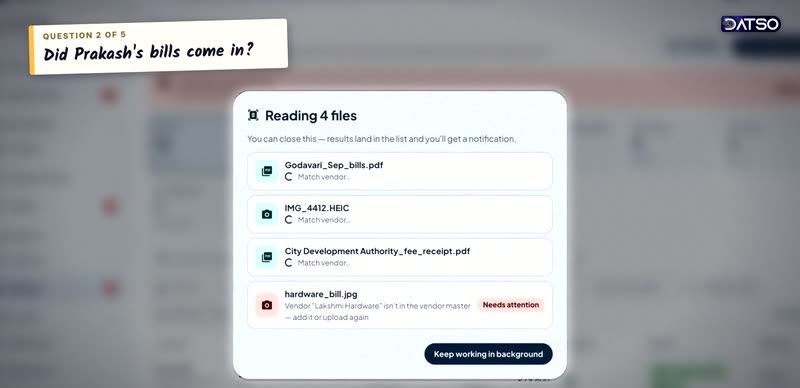
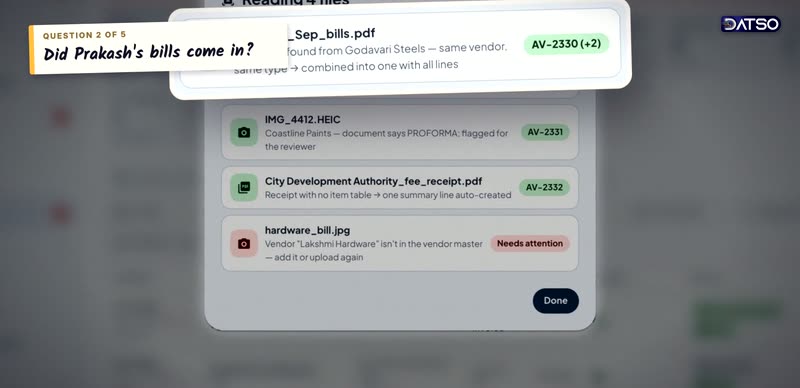
Prakash sent September's bills as one PDF. Zeno+ finds the three invoices inside it, all from Godavari Steels, and combines them into one bill with every line, without anyone typing.
Without it: Split the file and type each bill.
1AI finds each bill in the file
2Same vendor becomes one bill
Example 2 of 8
Stock is right in the unit you count.
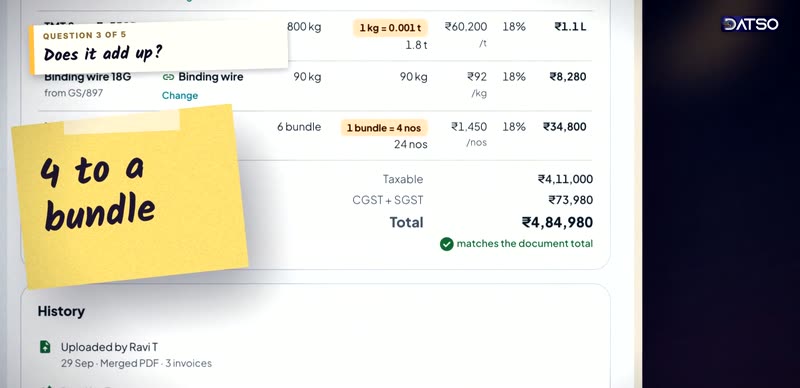
The steel bill lists MS chairs in bundles, but the store counts pieces. Set 1 bundle = 4 once, and every line and the bill total are checked in the unit you count.
Without it: Units converted by hand. Stock drifted.
16 bundles become 24 pieces
2A missing rule is asked once
3Wrong totals are flagged
Example 3 of 8
Only real bills reach payment.
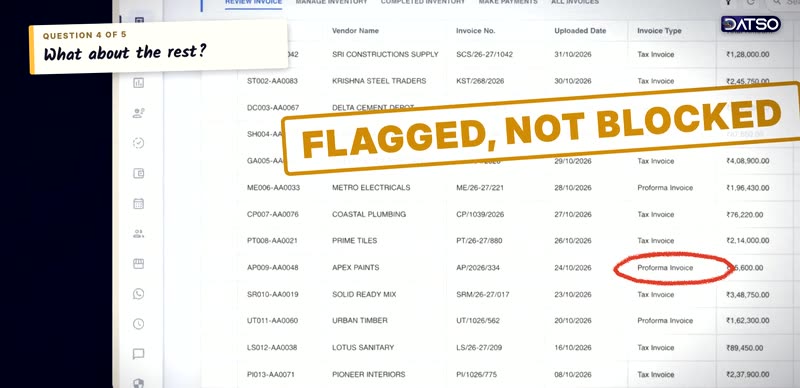
Coastline Paints uploaded a ₹96,400 proforma as a tax invoice. Zeno+ reads the type printed on the page and flags the mismatch, and the reviewer decides in one click. It's flagged, not blocked.
Without it: A proforma can be paid as if it were the final bill.
1AI reads the type on the page
2The reviewer chooses in one click
Example 4 of 8
Every cost goes through review.
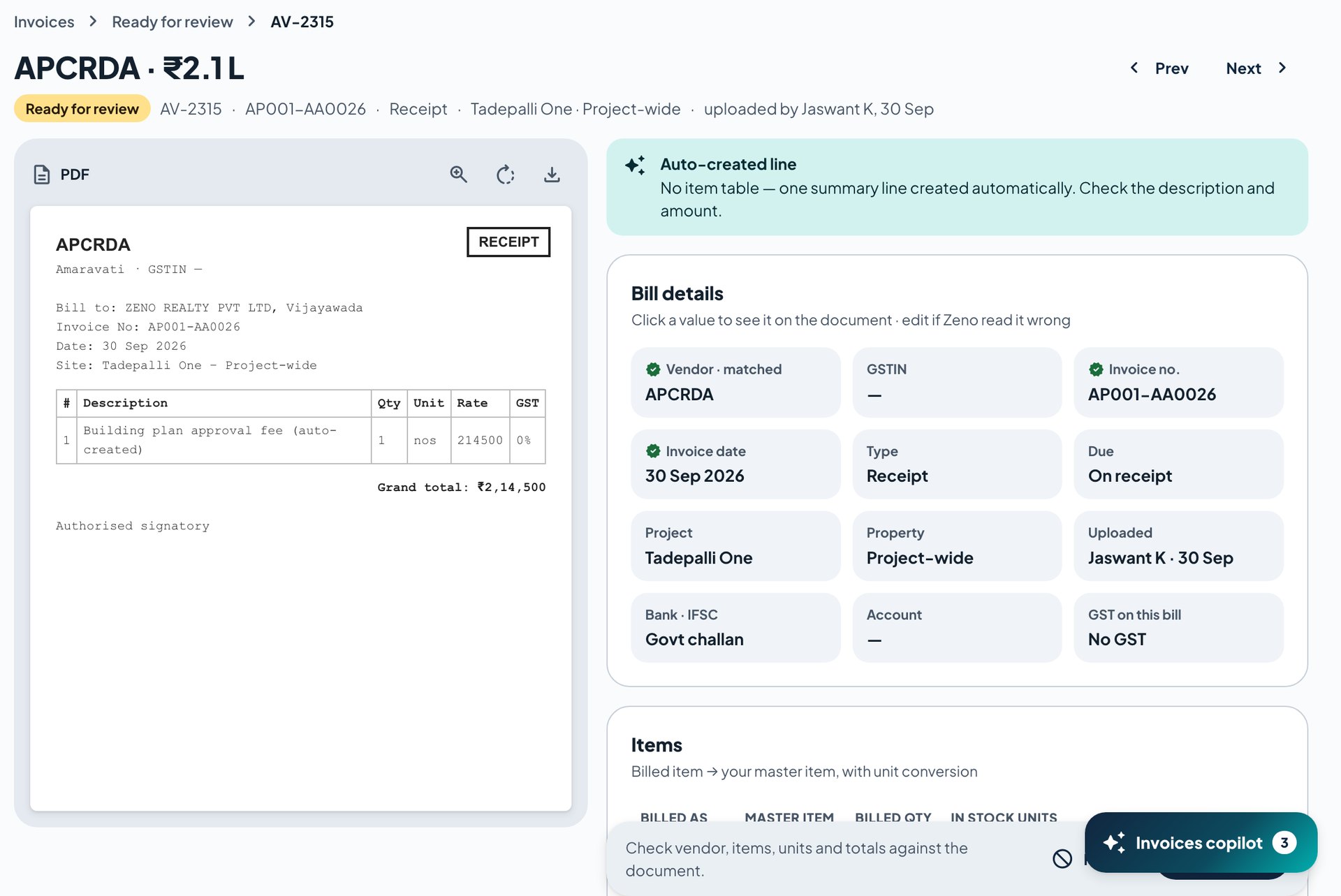
Fees, rent and utility bills have no item lines, so Zeno+ adds one summary line and marks it as auto-created. They still go through review like every other bill.
Without it: Fees and rent skip the usual checks.
12
1One summary line is added
2Clearly marked as auto-created
Example 5 of 8
Fixed on the spot. No bill is lost.
A blurry photo from Riverbed Sand can only be read at 31% confidence. Instead of guessing, Zeno+ stops, shows which step failed and why, and says what to do next.
Without it: A blurry photo is put aside and forgotten.
1Which step stopped
2Why, in plain words
3What to do next
Example 6 of 8
Pay only vendors you've set up.
A bill from Lakshmi Hardware arrives, but the vendor isn't set up yet. It's marked as needing attention at upload: add the vendor, retry, and it carries on.
Without it: Unknown vendors get paid unchecked.
1The problem is named
2Add vendor and retry
Example 7 of 8
Paid on time, with proof.
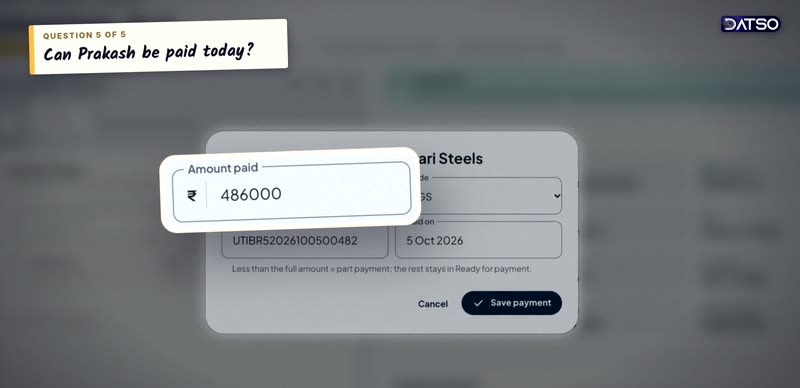
Stores confirm the goods arrived, the bill is approved, and Vikram records the ₹4,86,000 payment to Godavari Steels before the noon bank run.
Without it: Vendors chasing payment by phone.
1Approve the checked bill
2Record the amount paid
Example 8 of 8
Before Zeno+
Every bill is a manual job.
Any formatPDFs, scans, photos from site
Typed by handEvery line, every rate
Wrong bills paidProformas filed as invoices
Lost billsPut aside, then forgotten
What changes
Less typing. Fewer surprises.
AccountsCheck instead of typeLines, rates and GST arrive filled in.
OwnersOnly real bills get paidProformas and unknown vendors are caught first.
StoresStock in the right unitKilos and bundles converted for you.
EveryoneNothing disappearsEvery upload reaches review, or says why not.
A few practical questions.
What if a bill is a blurry photo?
Zeno+ shows which step stopped and why. Upload it again, enter it by hand, or retry.
Does it handle any vendor's format?
Yes. PDFs, scans with several bills in one file, and phone photos.
Who approves before payment?
Always a person on your team. AI only reads; it never approves a bill or makes a payment.
Invoices
Send us your hardest bills.
We'll run them through Zeno+ and show you the results.