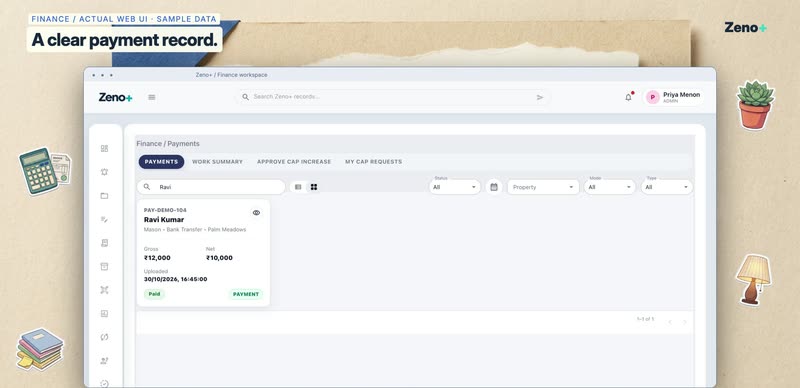
Finance in Zeno+: Ravi's masonry payment, from work review to a clear payment record · 2:25
Finance brings every vendor bill and crew payslip that is due into a single list, with the goods received and the budget alongside. No payment above budget goes through unreviewed: additional budget is requested with a reason and approved in one place, and an approved bill is paid only once the payment is recorded, in full or in part, with its reference. The ledger and the paid-against-due view update immediately.
5:05 pmRavi has his payment record. Every payment has a story
How it works, step by step.
01
RulesCollect what's dueApproved bills and payslips, in one list
02
RulesCheck itGoods received? Inside the budget? Overdue?
03
PersonDecideApprove extra budget, or send it back
04
PersonPayIn full or in part, with the UTR
05
RulesRecord itLedger and paid vs due, updated at once
No AI here. Rules and people.
Every number comes from the system, not from AI.
See it on real screens.
Know what to pay today.
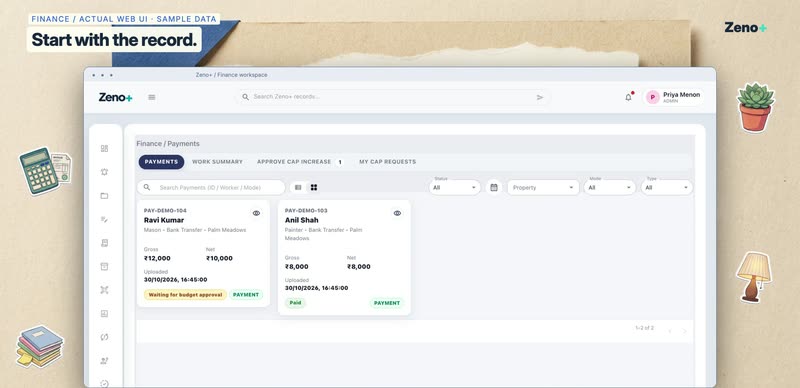
Everything due is in one list, with totals for bills, payslips and labour and the most urgent first. A status filter shows what needs attention, like payslips waiting for budget approval.
Without it: Bills in one sheet, labour in another.
1Totals: bills, payslips, labour
2Pay next, most urgent first
Example 1 of 7
Pay for what arrived, on time.
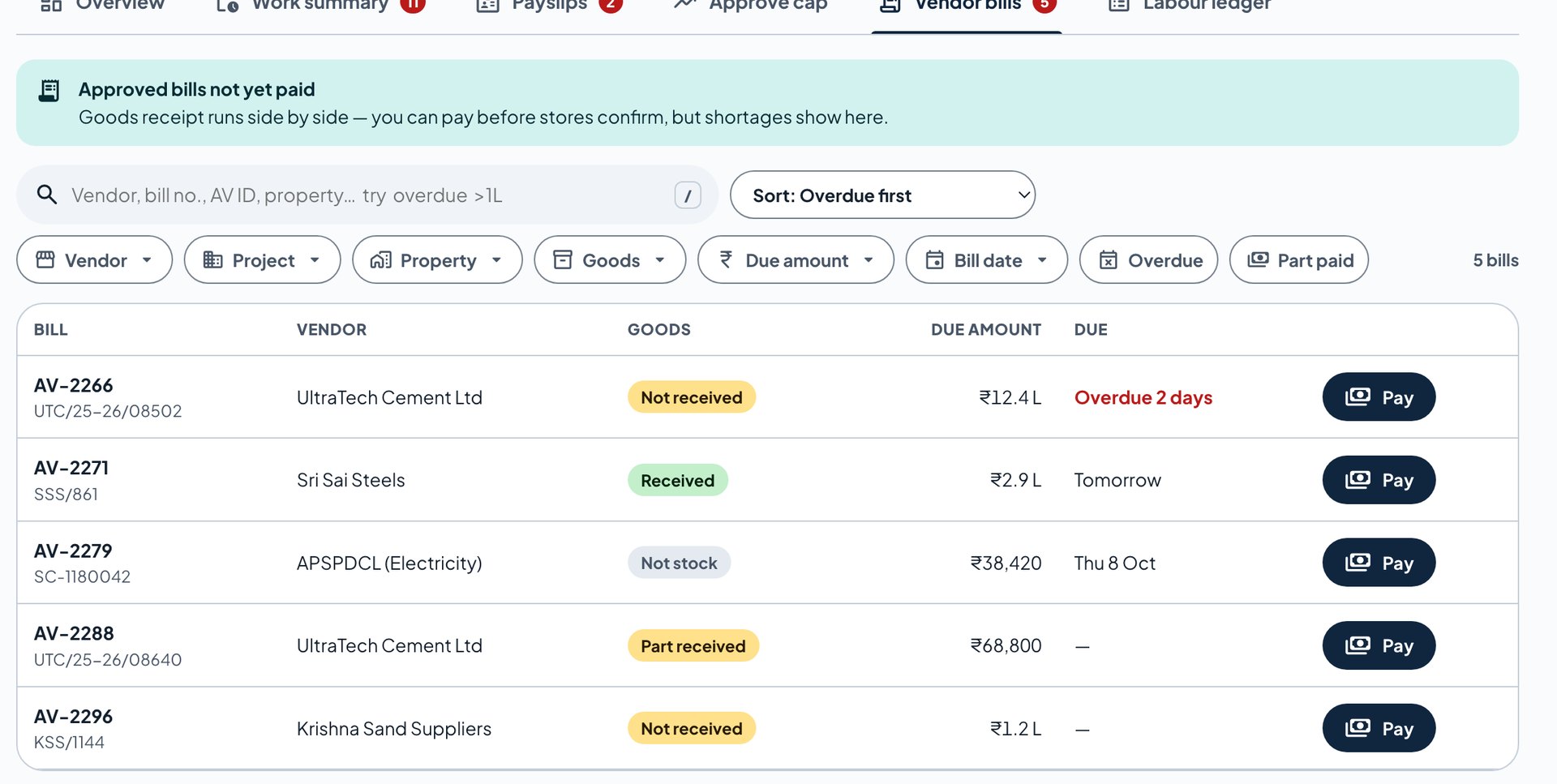
Every vendor bill shows its goods status beside it, overdue bills come first, and a shortage shows up before you pay.
Without it: Paid without checking what arrived.
123
1Goods status on every bill
2Overdue first
3Shortages show before you pay
Example 2 of 7
Every payment can be traced.
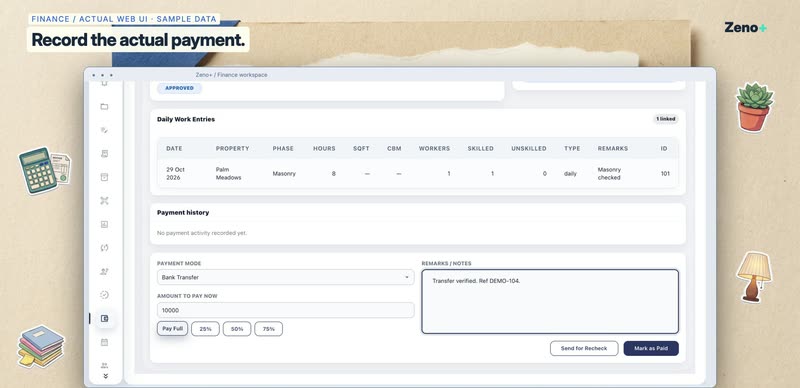
Priya checks the transfer, selects Pay Full and enters the reference, then marks it paid. Pay in full or in part, with the UTR or cheque number, and anything left stays ready to pay.
Without it: Payments made with no proof kept.
1Pay in full or in part
2UTR or cheque number
3The rest stays ready to pay
Example 3 of 7
Nothing over budget is paid unseen.
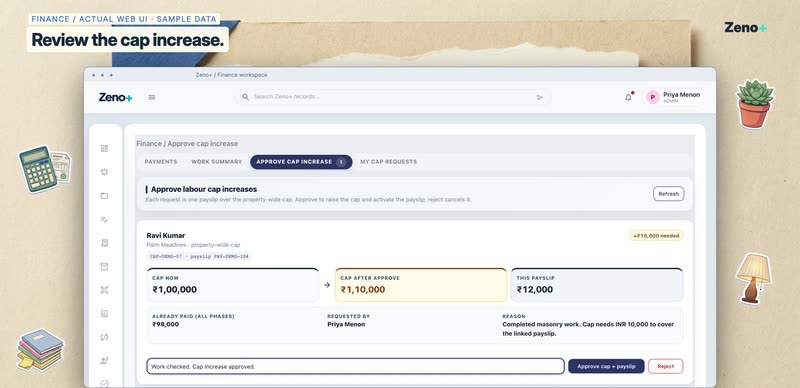
Ravi's payslip needs more than the cap allows. The request comes with its reason, the approver sees ₹98,000 already paid and approves a ₹10,000 increase, and the cap rises to ₹1,10,000. Approved means ready to pay, not paid.
Without it: Extra budget agreed on a phone call.
1The reason comes with the request
2Approve or reject
3Approved means ready to pay
Example 4 of 7
Month-end without guesswork.
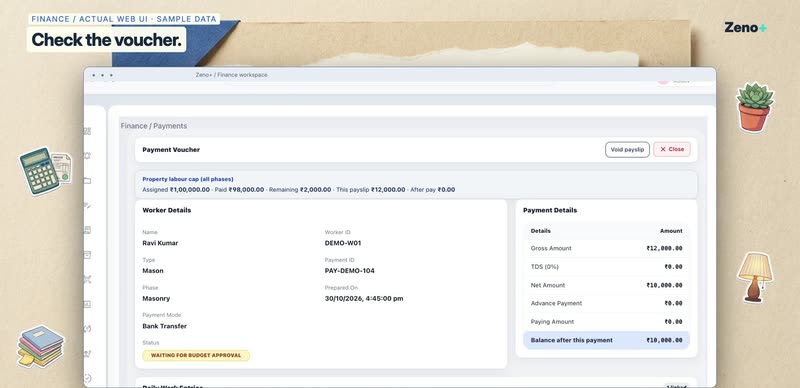
Go back to the work: the work summary shows the reporting period and the property, and the payslip makes the amount clear, ₹12,000 gross, less a ₹2,000 advance, ₹10,000 to pay. The ledger keeps every day of work with its payslip.
Without it: Labour totals rebuilt in Excel.
1Every day of work, with its payslip
2Filter by worker, property, payslip
3Download what you see
Example 5 of 7
See where the money is going.
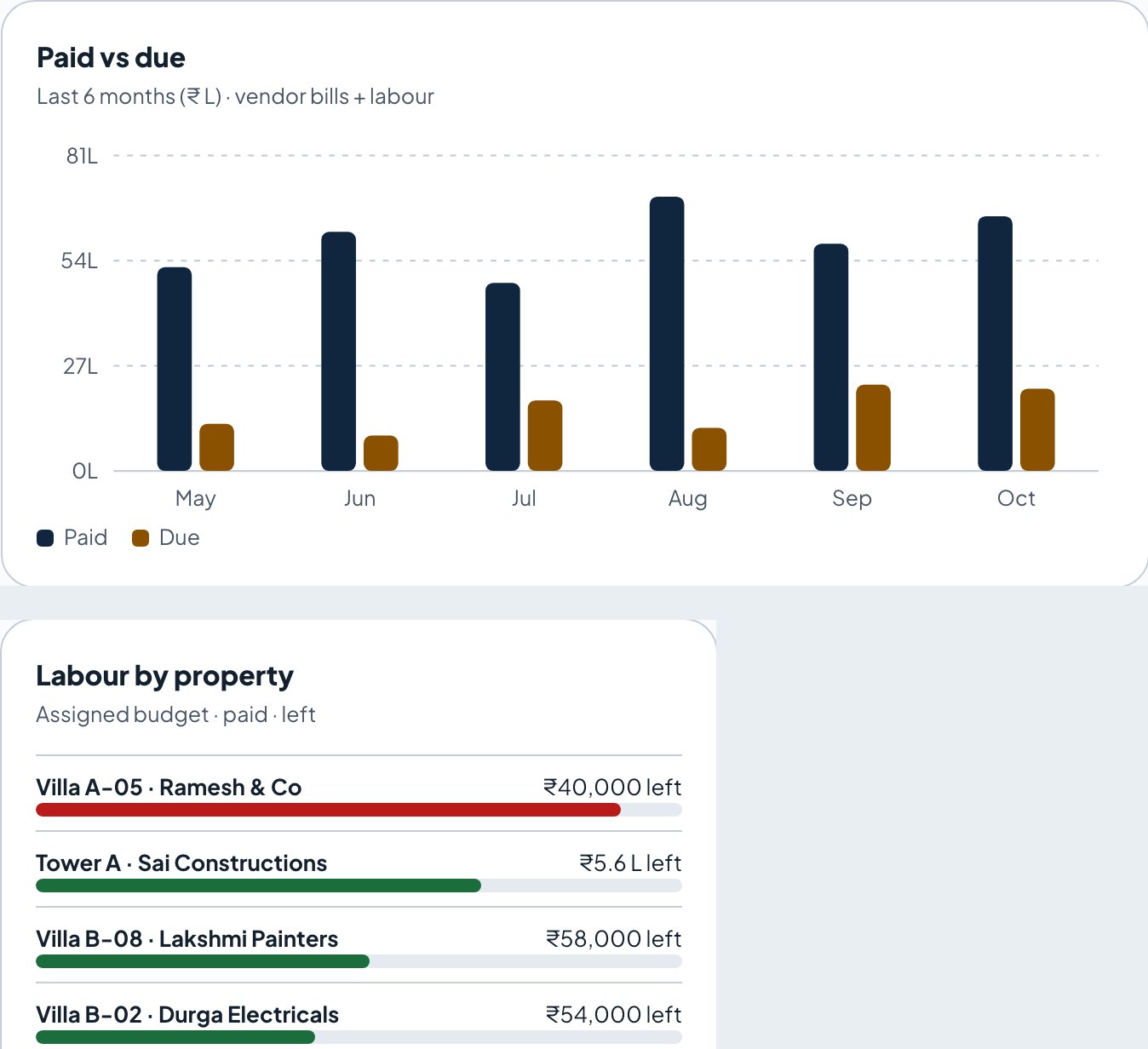
Paid against due for six months, and the budget used on each property, so you can see where the money is going.
Without it: Trends added up by hand.
12
1Paid and due, six months
2Budget used, per property
Example 6 of 7
Problems surface early.
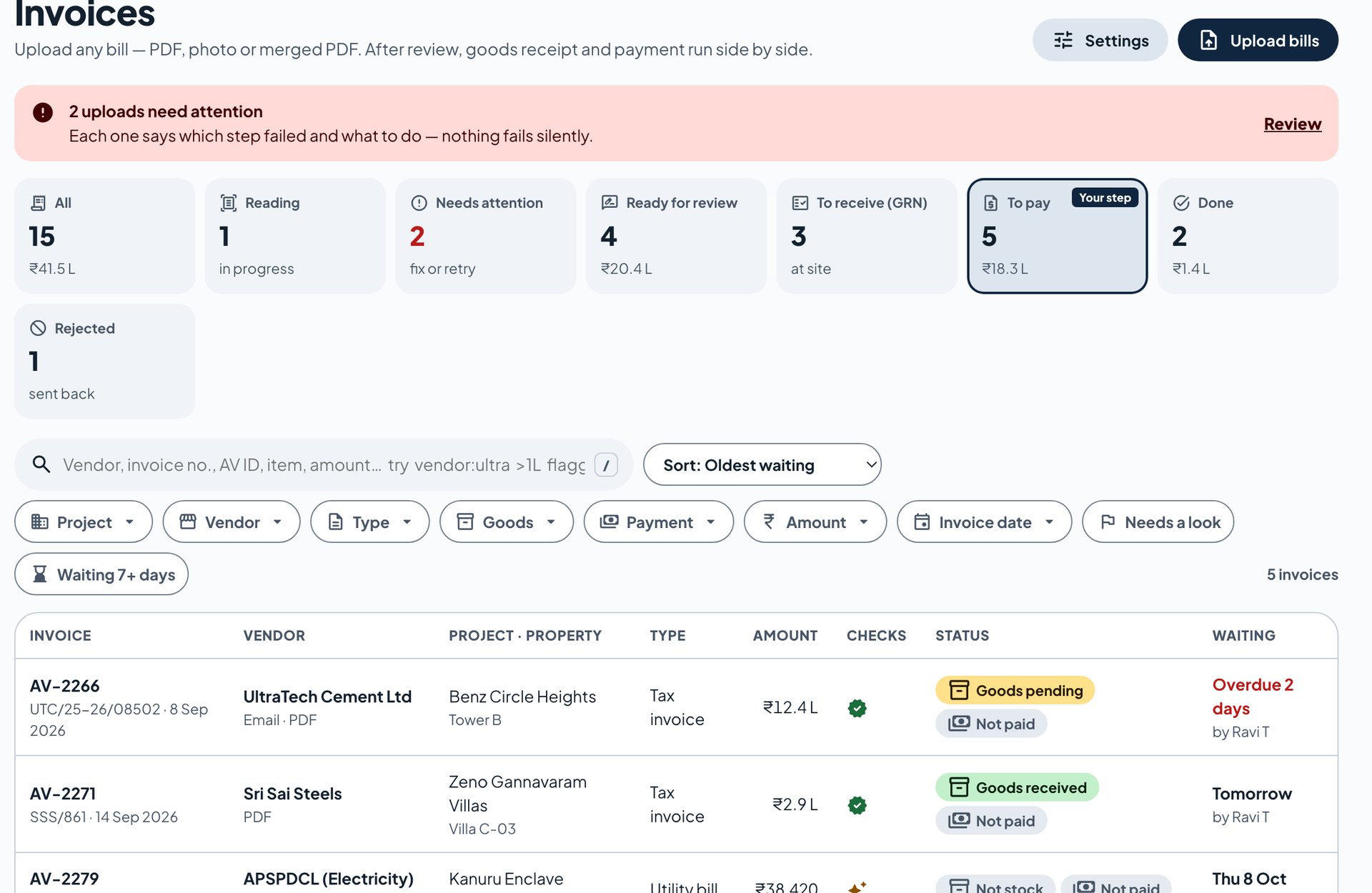
Overdue items show in red, goods and payment sit side by side, and anything waiting a week or more is one click away.
Without it: Overdue found when the vendor calls.
123
1Overdue, in red
2Goods and payment side by side
3Waiting a week or more, one click
Example 7 of 7
Before Zeno+
Money goes out from too many places.
Paid from many placesBank, cheques, cash, UPI
No proof keptReferences lost in chats
Overdue, found lateWhen the vendor calls
Month-end guessworkTotals rebuilt in Excel
What changes
Pay on time, with proof.
OwnersOne view of what's owedAnd where it went.
FinanceOne list to pay fromProof on every payment.
StoresGoods decide paymentShortages show first.
Owners and financeClean month-endA ledger you can check.
A few practical questions.
Can we pay part of a bill?
Yes. Pay for what has arrived now. The rest stays due, and every payment carries its own proof.
Who decides extra budget?
A manager, in one place, before anything is paid. Every request needs a reason.
Does a flag stop a payment?
No. Flags never block a payment. They make sure someone looks first.
Finance
Send us last month's payments.
We'll show you what was due, what was paid, and what was paid without proof.